How to support different VLANs over a link between a Cisco switch and an HP Procurve switch could be confusing because of different terms and approaches used by the two vendors. This post aims to provide a short guide to make it work.
Notice that in the Procurve, the VLAN-port association is configured from the VLAN, while in Cisco IOS it is configured from the individual ports. Also "untagged" in the Procurve means "native" in Cisco terms, and "tagged" in the Procurve means "allowed" in Cisco terms. Now we can look at the actual configuration on both sides.
The configuration on the Cisco side should be:
On the Procurve side the configuration should be:
And yes, it worked:
PS: The last ping worked because I configured the default gateway on both switches (there is no VLAN 100 in the Procurve so the ping traffic has to be routed by the default gateways).
My notes on networking technology. This will always be a continuing effort as I review old topics and learn new ones. Comments are more than welcome.
Showing posts with label Cisco. Show all posts
Friday, November 3, 2017
Saturday, September 5, 2015
A Close Look at the Redistribution of OSPF Routes into BGP in the ProCurve
As an example, consider the following network diagram:
OSPF Area 0 includes switches SW1, SW3 and SW4. In SW3, a static route to network 10.8.0.0/16 is configured, and this static route is configured to be redistributed into OSPF. Also in SW3, subnet 192.168.13.0/24 (or VLAN 13) is connected and also configured to be redistributed into OSPF.
We will focus on SW1, where both OSPF and BGP are configured, and where OSPF routes are exported into BGP.
First, the routing table in SW1 will look like this:
Notice that SW1 learned 3 routes from OSPF:
- 10.12.30.0/24 (VLAN 30) generated from with OSPF, hence listed here as "IntrArea" and considered an internal route.
- 10.8.0.0/16 and 192.168.13.0/24 (VLAN 13) distributed into OSPF from "static" and "connected", hence listed here as "External2" and considered external routes.
Now let's look at the distribution of these OSPF routes into BGP in SW1. Below is how SW1 is configured under BGP router (Scenario 1):
router bgp 1200
enable
redistribute ospf
neighbor 192.168.20.2 remote-as 1300
exit
With the above configuration, the BGP routing table in SW1 will look like:
As seen in the screenshot above, only the OSPF route 10.12.30.0/24 appeared in the BGP routing table. The reason is that the command "redistribute ospf" under BGP only exports OSPF internal routes into BGP. All external routes are excluded from the redistribution.
Now consider another BGP configuration in SW1 (Senario 2):
router bgp 1200
enable
network 10.8.0.0 255.255.0.0
redistribute ospf
neighbor 192.168.20.2 remote-as 1300
exit
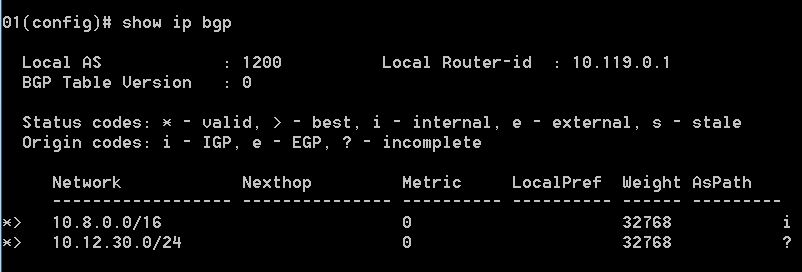
In this configuration, under BGP we have the command "network 10.8.0.0 255.255.0.0". The resulting BGP routing table will looks like:
In the screenshot above, in addition to the OSPF internal route of 10.12.30.0/24 (VLAN 30) which is exported into BGP by the command redistribute ospf, the route to subnet 10.8.0.0/16 also appears in the BGP table because in this scenario we have the command network 10.8.0.0 255.255.0.0 under BGP. In contrast, a route to subnet 192.168.13.0/24 (VLAN 13) is not present in the BGP routing table because this subnet is not configured with the network command under BGP.
The bottom line is that in the ProCurve, OSPF external routes cannot be exported into BGP using the redistribute command. They have to be specified using the network command under BGP to be present in the BGP routing table. This is different from Cisco IOS, which allows the export of OSPF external routes into BGP by the command redistribute ospf 1 match external.
OSPF Area 0 includes switches SW1, SW3 and SW4. In SW3, a static route to network 10.8.0.0/16 is configured, and this static route is configured to be redistributed into OSPF. Also in SW3, subnet 192.168.13.0/24 (or VLAN 13) is connected and also configured to be redistributed into OSPF.
We will focus on SW1, where both OSPF and BGP are configured, and where OSPF routes are exported into BGP.
First, the routing table in SW1 will look like this:
Notice that SW1 learned 3 routes from OSPF:
- 10.12.30.0/24 (VLAN 30) generated from with OSPF, hence listed here as "IntrArea" and considered an internal route.
- 10.8.0.0/16 and 192.168.13.0/24 (VLAN 13) distributed into OSPF from "static" and "connected", hence listed here as "External2" and considered external routes.
Now let's look at the distribution of these OSPF routes into BGP in SW1. Below is how SW1 is configured under BGP router (Scenario 1):
router bgp 1200
enable
redistribute ospf
neighbor 192.168.20.2 remote-as 1300
exit
With the above configuration, the BGP routing table in SW1 will look like:
As seen in the screenshot above, only the OSPF route 10.12.30.0/24 appeared in the BGP routing table. The reason is that the command "redistribute ospf" under BGP only exports OSPF internal routes into BGP. All external routes are excluded from the redistribution.
Now consider another BGP configuration in SW1 (Senario 2):
router bgp 1200
enable
network 10.8.0.0 255.255.0.0
redistribute ospf
neighbor 192.168.20.2 remote-as 1300
exit
In this configuration, under BGP we have the command "network 10.8.0.0 255.255.0.0". The resulting BGP routing table will looks like:
In the screenshot above, in addition to the OSPF internal route of 10.12.30.0/24 (VLAN 30) which is exported into BGP by the command redistribute ospf, the route to subnet 10.8.0.0/16 also appears in the BGP table because in this scenario we have the command network 10.8.0.0 255.255.0.0 under BGP. In contrast, a route to subnet 192.168.13.0/24 (VLAN 13) is not present in the BGP routing table because this subnet is not configured with the network command under BGP.
The bottom line is that in the ProCurve, OSPF external routes cannot be exported into BGP using the redistribute command. They have to be specified using the network command under BGP to be present in the BGP routing table. This is different from Cisco IOS, which allows the export of OSPF external routes into BGP by the command redistribute ospf 1 match external.
Labels:
BGP,
Cisco,
export,
external route,
OSPF,
ProCurve,
redistribution
Subscribe to:
Posts (Atom)