
OSPF Area 0 includes switches SW1, SW3 and SW4. In SW3, a static route to network 10.8.0.0/16 is configured, and this static route is configured to be redistributed into OSPF. Also in SW3, subnet 192.168.13.0/24 (or VLAN 13) is connected and also configured to be redistributed into OSPF.
We will focus on SW1, where both OSPF and BGP are configured, and where OSPF routes are exported into BGP.
First, the routing table in SW1 will look like this:

Notice that SW1 learned 3 routes from OSPF:
- 10.12.30.0/24 (VLAN 30) generated from with OSPF, hence listed here as "IntrArea" and considered an internal route.
- 10.8.0.0/16 and 192.168.13.0/24 (VLAN 13) distributed into OSPF from "static" and "connected", hence listed here as "External2" and considered external routes.
Now let's look at the distribution of these OSPF routes into BGP in SW1. Below is how SW1 is configured under BGP router (Scenario 1):
router bgp 1200
enable
redistribute ospf
neighbor 192.168.20.2 remote-as 1300
exit
With the above configuration, the BGP routing table in SW1 will look like:

As seen in the screenshot above, only the OSPF route 10.12.30.0/24 appeared in the BGP routing table. The reason is that the command "redistribute ospf" under BGP only exports OSPF internal routes into BGP. All external routes are excluded from the redistribution.
Now consider another BGP configuration in SW1 (Senario 2):
router bgp 1200
enable
network 10.8.0.0 255.255.0.0
redistribute ospf
neighbor 192.168.20.2 remote-as 1300
exit
In this configuration, under BGP we have the command "network 10.8.0.0 255.255.0.0". The resulting BGP routing table will looks like:
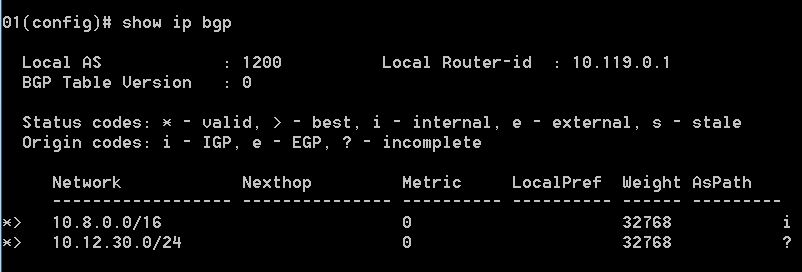
In the screenshot above, in addition to the OSPF internal route of 10.12.30.0/24 (VLAN 30) which is exported into BGP by the command redistribute ospf, the route to subnet 10.8.0.0/16 also appears in the BGP table because in this scenario we have the command network 10.8.0.0 255.255.0.0 under BGP. In contrast, a route to subnet 192.168.13.0/24 (VLAN 13) is not present in the BGP routing table because this subnet is not configured with the network command under BGP.
The bottom line is that in the ProCurve, OSPF external routes cannot be exported into BGP using the redistribute command. They have to be specified using the network command under BGP to be present in the BGP routing table. This is different from Cisco IOS, which allows the export of OSPF external routes into BGP by the command redistribute ospf 1 match external.

